UEEx Beginner’s Guide to Buying Cryptocurrency
Welcome to UEEx. Before you start trading, you need to deposit digital assets into your UEEx account.
Currently, UEEx does not support direct cryptocurrency purchases with bank cards, credit cards, e-wallets, or other fiat payment methods within the platform.
You can obtain cryptocurrency and deposit it into UEEx through the following methods:
- Buy cryptocurrency on another exchange or wallet, then transfer it to UEEx on-chain
- Buy cryptocurrency through a third-party fiat on/off-ramp provider, then transfer it to UEEx
1. What Do You Need Before Buying Cryptocurrency?
Before depositing assets into UEEx, please make sure you have completed the following:
- Registered a UEEx account
- Completed the necessary account security settings
- Confirmed the cryptocurrency you want to deposit, such as USDT, BTC, ETH, etc.
- Confirmed that UEEx supports the selected cryptocurrency and deposit network
- Have access to an external exchange, wallet, or third-party crypto purchase platform
Important: Before making a deposit, always check the coin, network, and deposit address carefully. Using the wrong network or address may result in permanent asset loss.
2. Method 1: Buy Crypto on Another Platform and Transfer to UEEx
If you already have digital assets on another exchange or wallet, you can transfer them to UEEx through an on-chain transaction.
How to Deposit from Another Platform
Step 1: Buy Cryptocurrency on an External Platform
You can buy cryptocurrency on another exchange or wallet that supports fiat purchases.
Common purchase methods may include:
- Bank card purchase
- Credit/debit card purchase
- C2C / P2P trading
- Bank transfer
- Third-party payment methods
The available purchase methods depend on the rules of the external platform.
Step 2: Open the UEEx Deposit Page
Open the UEEx App and go to:
Assets → Deposit
Select the cryptocurrency you want to deposit, such as:
USDT
Step 3: Select the Deposit Network
Choose the same blockchain network as the withdrawal network selected on the external platform.
For example, when depositing USDT, you may see different networks such as:
- TRC20
- ERC20
- BSC
- Polygon
- Arbitrum
The supported networks are subject to the actual information displayed on the UEEx deposit page.
Key point: The withdrawal network selected on the external platform must exactly match the deposit network selected on UEEx.
Step 4: Copy Your UEEx Deposit Address
Copy the deposit address shown on the UEEx deposit page.
please make sure to copy and fill it in correctly.
If you forget to enter the required Memo, Tag, or Payment ID, your assets may not be credited successfully.
Step 5: Withdraw from the External Platform
Return to the external exchange or wallet and select:
Withdraw
Fill in the following information:
- UEEx deposit address
- Correct blockchain network
- Withdrawal amount
- Memo / Tag, if required
After confirming that all information is correct, submit the withdrawal.
Step 6: Wait for Blockchain Confirmation
After the withdrawal is submitted, the transaction must be confirmed on the blockchain.
The arrival time depends on:
- Selected network
- Network congestion
- External platform review speed
- Required blockchain confirmations
Once the deposit is credited, you can view the balance on your UEEx Assets page.
3. Method 2: Buy Crypto Through a Third-Party Provider and Transfer to UEEx
If you do not have an account on another exchange, you may choose to buy cryptocurrency through a third-party fiat on/off-ramp provider.
For example, users may buy cryptocurrency through providers such as MoonPay, then send the assets to their UEEx deposit address.
Note: Third-party crypto purchase providers are not UEEx’s built-in fiat deposit service. Prices, fees, processing time, KYC requirements, and supported regions are determined by the third-party provider.
How to Buy Crypto Through a Third-Party Provider
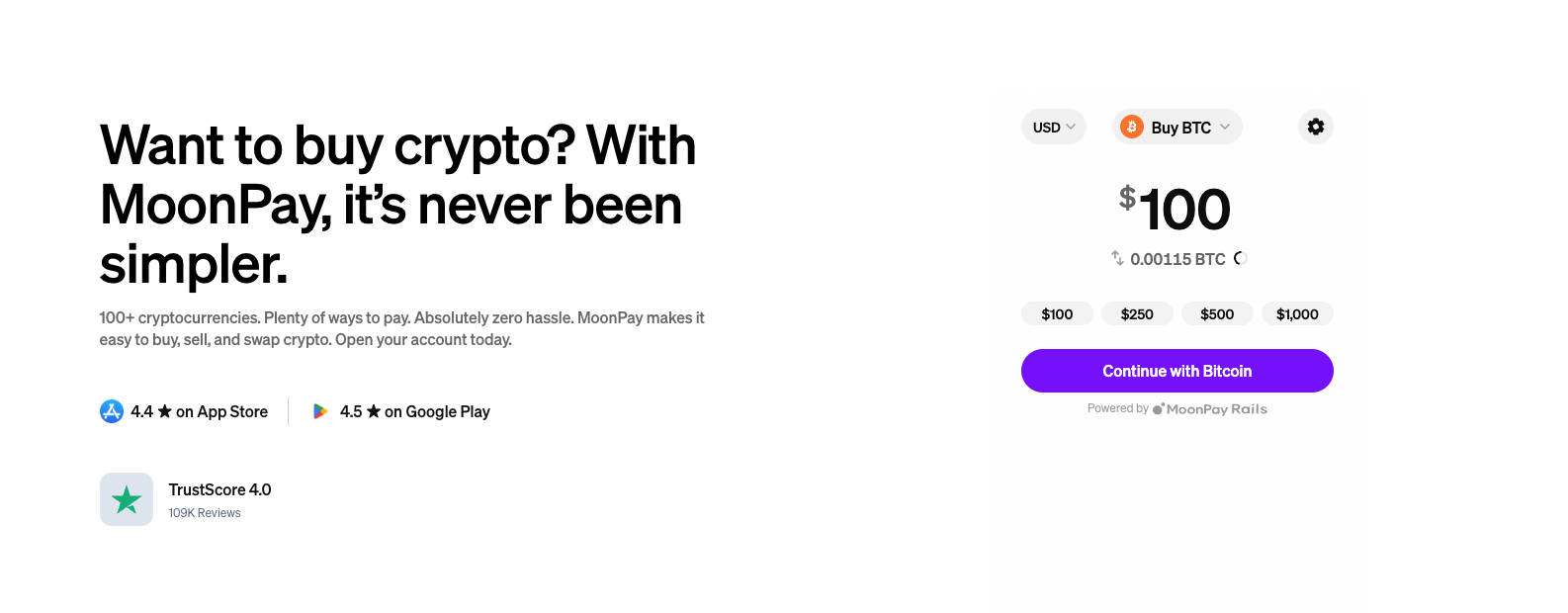
Step 1: Visit a Third-Party Crypto Purchase Platform
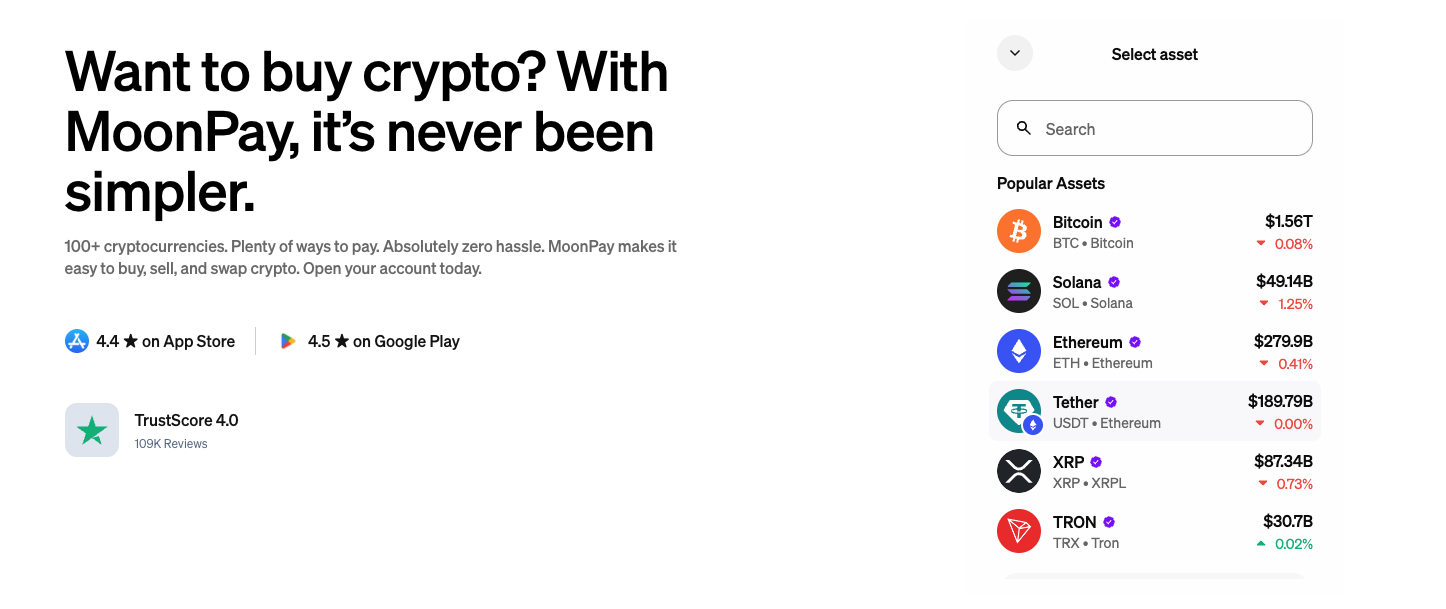
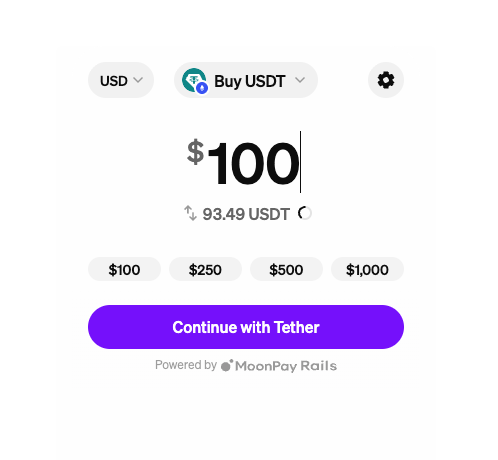
Go to a third-party crypto purchase provider, such as a MoonPay-type service.
Select the cryptocurrency you want to buy, such as:
Step 2: Choose a Payment Method
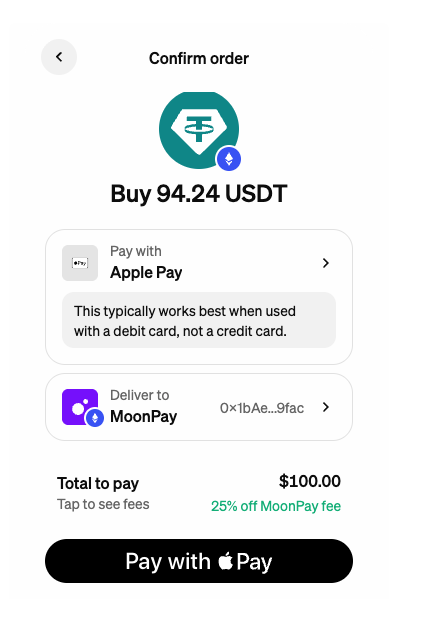
The third-party provider may support different payment methods, such as:
- Bank card
- Credit/debit card
- Bank transfer
- Apple Pay / Google Pay, if supported
- Other local payment methods, if supported
The available payment methods depend on the third-party platform.
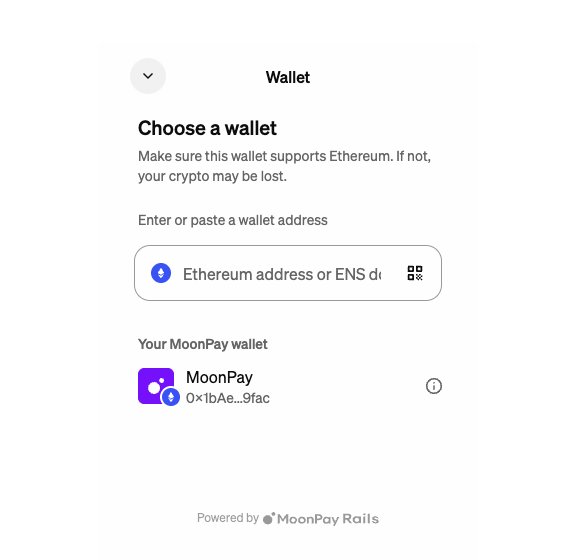
Step 3: Enter Your UEEx Deposit Address
On the third-party purchase page, you will usually need to enter a receiving address.
Go back to UEEx and follow this path:
Assets → Deposit → Select Coin → Select Network → Copy Deposit Address
Then paste your UEEx deposit address into the third-party platform.
Step 4: Confirm That the Network Matches
Before completing the purchase, please confirm:
- The coin sent by the third-party platform matches the coin selected on UEEx
- The network selected by the third-party platform matches the deposit network selected on UEEx
- The deposit address is complete and correct
- Memo / Tag is entered correctly if required
Example:
If you select a USDT-TRC20 deposit address on UEEx, the third-party platform must also send USDT through the TRC20 network.
Step 5: Complete Payment and Identity Verification
The third-party platform may require identity verification, which may include:
- Email verification
- Phone verification
- Identity document verification
- Facial recognition
- Payment verification
Verification requirements are determined by the third-party platform.
Step 6: Wait for the Assets to Arrive
After the third-party platform completes the purchase and sends the crypto on-chain, the assets will be transferred to your UEEx deposit address.
Once the deposit is credited, you can view the balance on your UEEx Assets page and start using services such as:
- Spot trading
- Futures trading
- Mini Contracts
- Margin trading
- Lending
4. How to Choose the Correct Deposit Network
When selecting a deposit network, focus on three key items:
| Item |
Description |
| Coin |
The asset you want to deposit, such as USDT |
| Network |
The blockchain network used for transfer, such as TRC20 or ERC20 |
| Address |
The deposit address provided by UEEx for the selected network |
All three must match.
Example
If you want to deposit USDT:
| UEEx Selection |
External Platform Must Also Select |
| USDT - TRC20 |
USDT - TRC20 |
| USDT - ERC20 |
USDT - ERC20 |
| USDT - BEP20 |
USDT - BEP20 |
If UEEx selects TRC20 but the external platform sends through ERC20, the assets may not be credited successfully.
5. What Can You Do After the Deposit Arrives?
After your deposit is credited, you can use the following UEEx features:
| Feature |
Description |
| Spot Trading |
Exchange one digital asset for another |
| Futures Trading |
Trade price movements by going long or short |
| Mini Contracts |
A lightweight contract trading product |
| Margin Trading |
Borrow funds to increase trading capacity |
| Lending |
Use digital assets for borrowing or lending-related services |
6. FAQ
Can I buy crypto directly with a bank card on UEEx?
Not currently.
UEEx does not currently provide built-in fiat deposit or crypto purchase services. Users need to buy cryptocurrency on an external platform first, then deposit it into UEEx through an on-chain transfer.
Can I transfer crypto from another exchange to UEEx?
Yes.
You can withdraw digital assets from another exchange or wallet and deposit them into the corresponding UEEx coin and network deposit address.
Can I buy crypto through providers like MoonPay and transfer it to UEEx?
Yes.
You can use a third-party crypto purchase provider to buy digital assets and send them to your UEEx deposit address.
Please note that fees, exchange rates, payment methods, KYC requirements, and arrival time are determined by the third-party provider.
Why has my deposit not arrived yet?
Common reasons include:
- Blockchain network congestion
- The external platform is still reviewing the withdrawal
- Insufficient blockchain confirmations
- Wrong network selected
- Incorrect deposit address
- Missing Memo / Tag
- The deposited coin or network is not supported
You can first check the withdrawal status and transaction hash, also known as TXID, on the external platform, then check your UEEx deposit record.
What should I do if I selected the wrong network?
If the wrong network is selected, the assets may not arrive and may be unrecoverable.
Before making a deposit, always confirm:
- The coin is correct
- The network is correct
- The address is correct
- The Memo / Tag is correct, if required
7. Security Tips
To protect your assets, please follow these guidelines:
1. Only Copy the Deposit Address from the Official UEEx Page
Do not deposit using addresses from screenshots, chat messages, or addresses forwarded by others.
2. Make a Small Test Transfer First
For your first deposit of a coin or network, it is recommended to make a small test transfer before sending a larger amount.
3. Make Sure the Networks Match
The withdrawal network on the external platform must match the UEEx deposit network.
4. Pay Attention to Third-Party Provider Fees
Third-party crypto purchase providers may charge payment fees, blockchain network fees, or include exchange-rate spreads.
5. Beware of Phishing Websites
Only access UEEx and third-party providers through official channels.
6. Do Not Transfer Assets to Strangers
Do not trust unofficial services such as “assisted deposits,” “discounted crypto purchases,” or “internal exchange rates.”
8. Disclaimer
This guide is intended to help users understand how to deposit digital assets into UEEx. It does not constitute investment advice, trading advice, or any guarantee of returns.
Digital asset prices are highly volatile. On-chain transfers also involve risks such as network congestion, incorrect addresses, and wrong network selection. Users should carefully verify all deposit information and are solely responsible for any risks arising from their actions.
UEEx currently focuses on services such as Spot, Futures, Mini Contracts, Margin, and Lending. After depositing funds, users should fully understand the rules, fees, funding costs, liquidation risks, and other product risks before participating in trading.








The final interpretation right belongs to UEEx official.